Usage
The following workflow will attempt to illustrate the typical usage of the smart city stack.
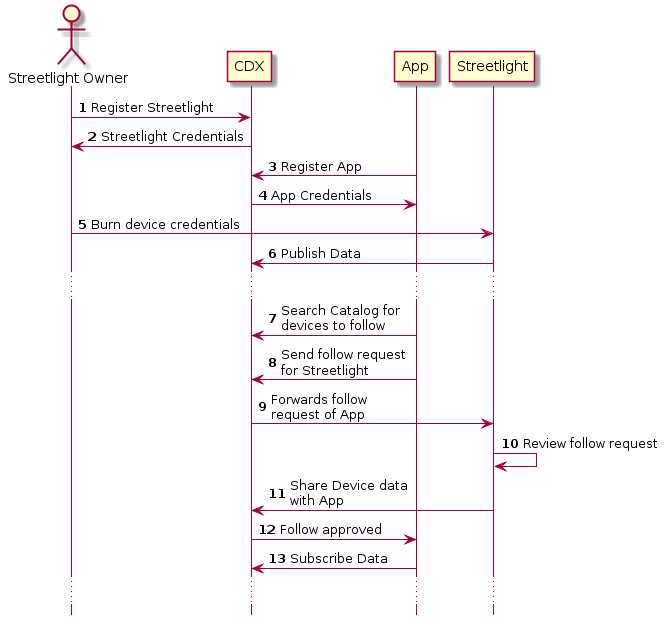
Figure 1 : Usage overview of CDX
Consider that two devices have registered with the middleware viz. “streetlight” and “app”. The API keys obtained are as follows:
For the streetlight
{
  "Registration": "success",
  "entityID": "streetlight",
  "apiKey": "ReiHIzTA6hQRbv3JO2gRHP9iEh4NzK-bBSl-J0GKJZo",
  "subscriptionEndPoint": "https://smartcity.rbccps.org/api/{version}/follow?id=streetlight",
  "accessEndPoint": "https://smartcity.rbccps.org/api/{version}/db?id=streetlight",
  "publicationEndPoint": "https://smartcity.rbccps.org/api/{version}/publish?id=streetlight",
  "resourceAPIInfo": "https://rbccps-iisc.github.io"
}
For the app
{
  "Registration": "success",
  "entityID": "app",
  "apiKey": "7KfqcDOPvz3JECUwwGsQYuTdKtyGTQTpLDaZjIbJpMt",
  "subscriptionEndPoint": "https://smartcity.rbccps.org/api/{version}/follow?id=app",
  "accessEndPoint": "https://smartcity.rbccps.org/api/{version}/db?id=app",
  "publicationEndPoint": "https://smartcity.rbccps.org/api/{version}/publish?id=app",
  "resourceAPIInfo": "https://rbccps-iisc.github.io"
}
Now let’s say that the device
appis interested instreetlight‘s data. It should make afollowrequest tostreetlightas below:curl -X POST \ https://localhost:8443/api/1.0.0/follow \ -H 'Content-Type: application/json' \ -H 'apikey: 7KfqcDOPvz3JECUwwGsQYuTdKtyGTQTpLDaZjIbJpMt' \ -d '{ "entityID": "streetlight", "permission":"read", "validity": "10D", "requestorID":"app" }'
Note that the API key used to make the follow request is that of
app‘s. Once the request goes through, we get the success response as{"status":"Follow request has been made to streetlight.follow with permission read at 2018-09-10T17:15:23.330Z"}
The device
streetlightwould have got a notification in itsstreetlight.followqueue. It will subscribe using:curl -X GET \ https://localhost:8443/api/1.0.0/subscribe/streetlight.follow/1 \ -H 'apikey: ReiHIzTA6hQRbv3JO2gRHP9iEh4NzK-bBSl-J0GKJZo'
Note that the API key used is that of
streetlight’s. This gives back a response as:[ { "data": { "permission": "read", "validity": "10D", "requestor": "app", "timestamp": "2018-09-10T17:15:23.311Z" }, "topic": "#", "from": "streetlight.follow" } ]
Now that the device
streetlightknows that the deviceappis interested in its data, it can approve thefollowby calling theshare:curl -X POST \ https://localhost:8443/api/1.0.0/share \ -H 'Content-Type: application/json' \ -H 'apikey: ReiHIzTA6hQRbv3JO2gRHP9iEh4NzK-bBSl-J0GKJZo' \ -d '{ "entityID": "streetlight", "permission":"read", "validity": "10D", "requestorID":"app" }'
Note that the API key used to call the share is that of
streetlight’s. The above request would give back a response as{"status":"Share request approved for app with permission read at 2018-09-10T17:26:50.908Z"}
The issuance of
shareby thestreetlightsends out a notification to theapp.notifyqueue. Theappdevice can retrieve the status using:curl -X GET \ https://localhost:8443/api/1.0.0/subscribe/app.notify/1 \ -H 'apikey: 7KfqcDOPvz3JECUwwGsQYuTdKtyGTQTpLDaZjIbJpMt'
The API key used is that of
app’s. This would give out a response as[ { "data": { "Status update for follow request sent to streetlight": "Approved. You can now bind to streetlight.protected" }, "topic": "#", "from": "app.notify" } ]
Now that the device
apphas undertsood thatstretlighthas approved the request for read, it can now bind its queue tostreetlight.protectedusing:curl -X GET \ https://localhost:8443/api/1.0.0/bind/app/streetlight.protected \ -H 'apikey: 7KfqcDOPvz3JECUwwGsQYuTdKtyGTQTpLDaZjIbJpMt' \ -H 'routingKey: #'
Note that the API used is that of
app’s. This above request would give out a success message as:Bind Queue OK
Now if
streetlightpublishes any data using its API key:curl -X POST \ https://localhost:8443/api/1.0.0/publish/streetlight.protected \ -H 'Content-Type: application/json' \ -H 'apikey: ReiHIzTA6hQRbv3JO2gRHP9iEh4NzK-bBSl-J0GKJZo' \ -H 'routingKey: #' \ -d '{ "ambientLux": "10", "caseTemp": 34.5 }'
The device
appcan also get a copy of the data in its queue by using:curl -X GET \ https://localhost:8443/api/1.0.0/subscribe/app/1 \ -H 'apikey: 7KfqcDOPvz3JECUwwGsQYuTdKtyGTQTpLDaZjIbJpMt'Note the use of
app’s API key to subscribe. This would give a response as[ { "data": { "ambientLux": "10", "caseTemp": 34.5 }, "topic": "#", "from": "streetlight.protected" } ]